Sources
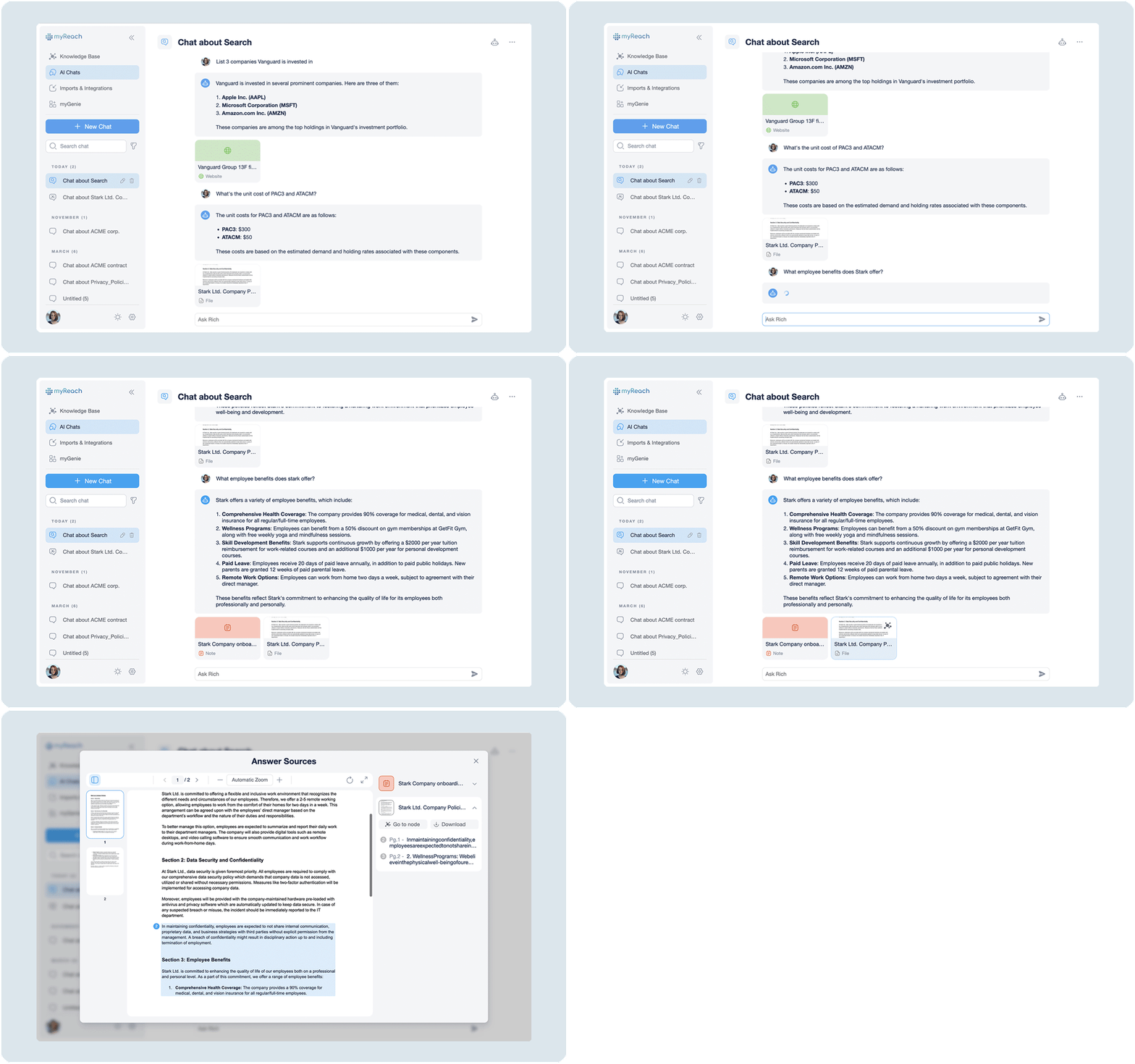
Transparency is a core pillar of the myReach Assistant. Every answer generated is grounded in your saved data, and the Assistant provides clear citations to show exactly which items were used to formulate a response. Whether the answer is based on one or multiple sources, the Assistant provides all the source cards beneath the answer. This eliminates "hallucinations" and ensures that every insight is verifiable and accurate.
By clicking on a Source Card at the bottom of an answer, you can instantly trace the data back to the original document, note or website. It opens up a preview of the source document, with specific highlighted sections within the text, where the information was taken from.
Overall, myReach is designed to give you context, accuracy, and confidence in every answer by making the source information accessible and easy to check.
Key Features of Source Cards
🔍 Precision Highlighting
When you click a source citation, myReach opens a preview of the document and highlights the relevant sections in blue.
- The Benefit: You no longer need to manually search through a 50-page PDF or a long meeting transcript. The Assistant shows you exactly where the information lives, saving you significant time in verification.
🌍 Instant Chunk Translation (New)
If you are working across global teams or researching in multiple languages, you can translate the source context instantly.
-
How it works: Next to the blue highlighted chunk in the source preview, there is a Translate Button.
-
The Benefit: Clicking this button allows you to translate that specific section into your preferred language, ensuring you understand the source material even if it was originally saved in a different language.
✅ Verified Indicator
As discussed in the Properties section, data integrity is paramount.
-
Function: If a source has been marked with the Verified property, a blue tick will appear prominently on the source card within the Assistant's answer.
-
The Benefit: This gives you immediate visual confirmation that the answer is based on "gold-standard" or official company documentation.
Accuracy & Trust
Zero-Hallucination Policy:
While many general AI tools have hallucination rates as high as 27%, myReach's retrieval system checks every response against your uploaded data, reducing the risk of inaccurate information to nearly 0%.
Multi-Source Synthesis:
The Assistant can combine information from multiple files (e.g., a PDF contract and a related Note) into a single answer, providing a comprehensive overview while still citing each source individually.
Direct Access:
Clicking the title in a source card will open the full Node, allowing you to view its properties, relationships and comments for even deeper context.