OCR (Optical Character Recognition)
OCR is the AI feature that allows myReach to "read" text within images and scanned documents. Without OCR, a scanned PDF or a screenshot is just a static image to an AI; with OCR, it becomes a searchable, readable and "learnable" piece of knowledge.
In myReach, OCR is integrated directly into the Learning process, ensuring that your visual data is just as accessible as your text files.
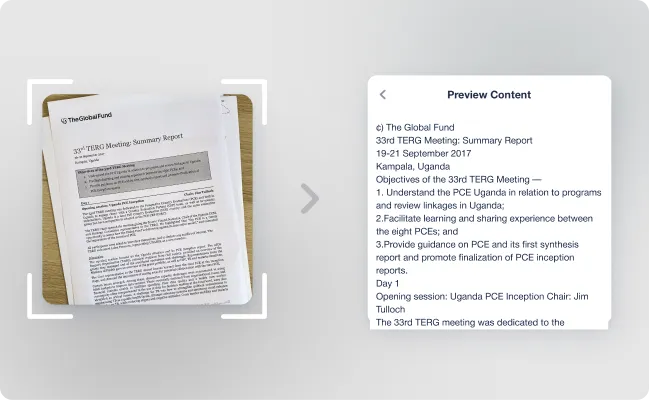
How it Works
When you upload an image (JPG, PNG) or a scanned PDF, the AI automatically detects that there is no "selectable" text. It then triggers the OCR engine to:
-
Scan the Visuals: Identify characters, words and sentences within the image.
-
Extract the Text: Convert those visual elements into a digital text layer.
-
Index for Search: Add that text to your Knowledge Base so you can find the file using Semantic Search.
You can preview the extracted content of the image in the "Preview Image Content" in the Node's options.
Use Cases for OCR
-
Scanned Contracts & Invoices: Process older documents that weren't originally saved as digital PDFs.
-
Screenshots: Save important snippets from social media, research papers, or websites and make the text inside them searchable.
-
Photos of Whiteboards or Notes: Convert your handwritten brainstorms or physical meeting notes into digital Nodes that the Assistant can summarise.
-
Business Cards: Capture contact information from a photo and let the AI extract the details into Properties.
Tracking OCR Status
You can verify if a document has been processed via OCR by checking the AI Status tab within the Node.
-
Learned: The OCR process is complete, and the text is now available for the Assistant.
-
Failed to Learn: If a Node fails, it may be due to poor image quality or handwriting that is too difficult to decipher. In these cases, we recommend uploading a higher-resolution version.