AI Prompt
The AI Prompt is the "brain" behind your AI Assistant and Genies. While the AI provides the information, the Prompt dictates how that information is delivered.
By defining specific criteria, you can fine-tune the output to align perfectly with your company's communication style and operational requirements. This ensures that every interaction – whether internal for your employees or external for your clients – is accurate, relevant and consistent with your brand identity.
(You can also customise the AI Prompt of the internal Assistant in the left sidebar of myReach. Click here to find out more).
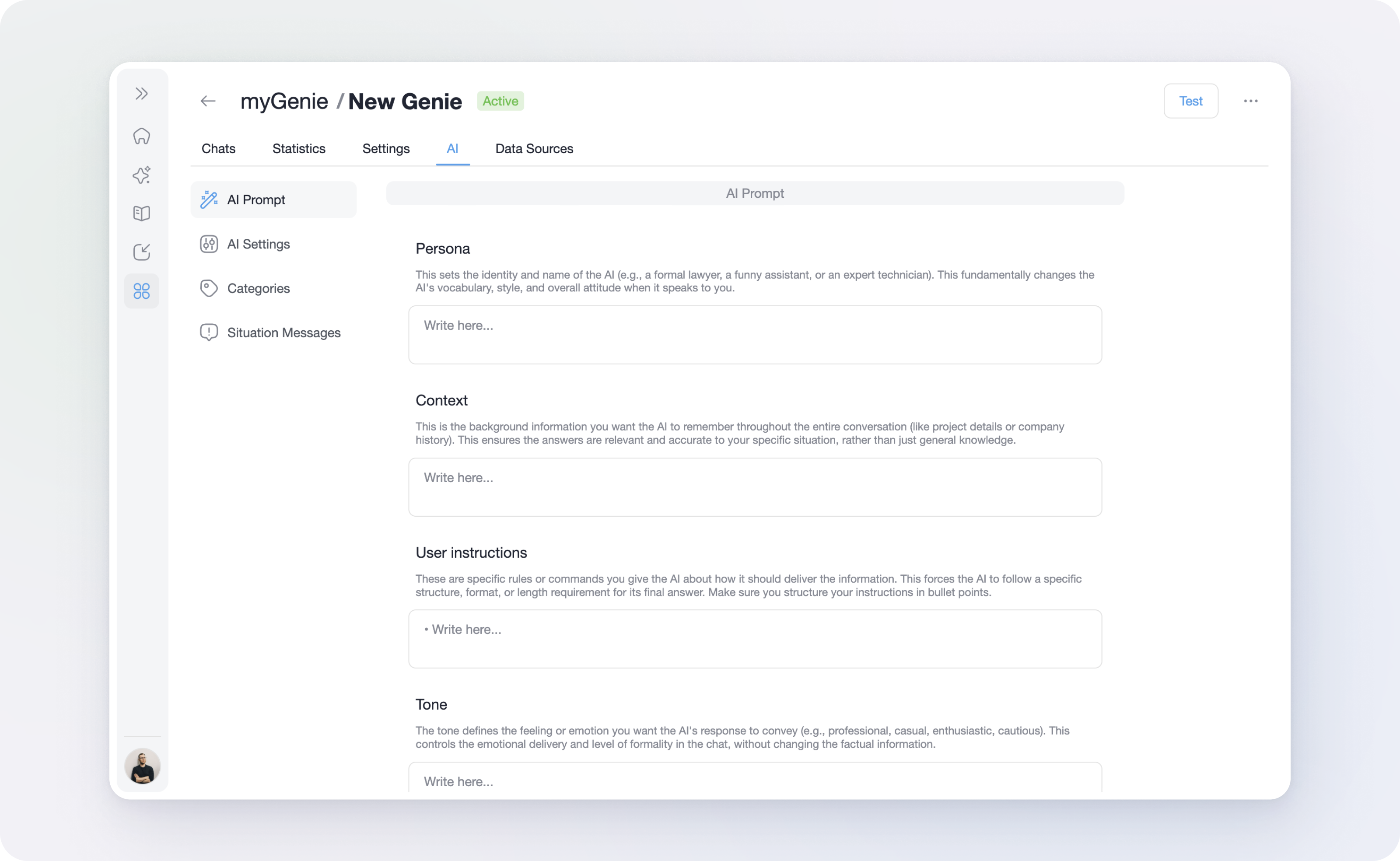
Breakdown of Customisation Sections
In the AI Prompt section (myGenie > AI > AI Prompt), you will find the different sections that can be customised.
Each section of the prompt serves a specific purpose in shaping the AI's behaviour. You can customise the following areas:
🎭 PERSONA
This sets the AI’s identity and name.
- Why it matters: It dictates the AI’s vocabulary, professional level and overall attitude.
- Example 1: "Your name is 'TechReady', you're a friendly and helpful IT support technician".
- Example 2: "You're 'LegalBot', a formal legal advisor specialising in UK property law".
📋 CONTEXT
This includes essential background information that the AI must keep in mind.
- Why it matters: It provides the "big picture" so the AI doesn't have to guess. This might include project goals, company history, or the specific target audience.
- Example: "GreenStep is a mid-sized UK firm currently transitioning from traditional plastics to biodegradable polymers. Our current primary focus is the 'Eco-Flow' product line launched in 2025. Prioritise information relevant to ISO 14001 standards and our commitment to a net-zero supply chain by 2030".
📝 USER INSTRUCTIONS
This highlights specific rules regarding the structure and format of the output.
- Why it matters: It saves you time on formatting. You can mandate the length of answers or the use of specific structures.
- Example: "Always provide answers in a bullet-pointed list" or "Keep responses under 150 words and include a call-to-action at the end".
🎨 TONE
This defines the feeling or emotion conveyed in the response. If it's for an internal Genie for your team, the tone might be more informal and friendly. If it's for a customer-facing Genie on your website, it might be more formal and professional.
- Why it matters: It ensures the AI reflects your brand's "voice" (professional, casual, enthusiastic, empathetic, etc).
- Example: For a medical database, you might set a Calm and Professional tone; for a marketing brainstorm tool, you might choose Creative and High-Energy.
🌐 LANGUAGE
This specifies the exact language the AI must use when answering.
- Why it matters: By default, the AI answers in the same language as the user's question. This setting overrides that, forcing the AI to stick to one language regardless of the input.
⚠️ If you want the AI to answer in the language of the user, leave this section empty. - Example: Useful for a French company that wants all internal synthesised answers to be in French, even if a user asks a question in English.
🔔 REMINDERS
This gives you two blank spaces for critical constraints that the AI must double-check before formulating every single answer.
- Why it matters: It acts as a safety net for your most important rules.
- Example: "Never mention competitor pricing" or "Always remind the user to consult the original PDF source for final verification".
The Value of a Custom Prompt
- Brand Consistency: Ensure that every interaction via your Genie sounds exactly like your company.
- Reduced Hallucinations: By providing clear Context and Reminders, you significantly lower the risk of the AI providing irrelevant or off-brand information.
- Efficiency: With User Instructions, the AI delivers data in the format you need immediately (ex: as an email draft or a table), eliminating the need for further editing.